

Adding more admin control and security’s features to the existing EN project and its customers.
Profile Identifier
Profile Identifier
Please implement a profile identifier on the EN top header. The Profile Identifier is a section where customer logs in and sees
Hello you are logged in as James Smith,on EN site admin – customers please create an extra column (after Date Joined) Latest login – here should be display a date of latest user login.
.
Contact Us Page Upgrade
Contact Us Page Upgrade
Please upgarde Contact us page. Please make all content alligned nicely ( currently image at the top then big gap and google map), please leave same image, modify form make it clean and clear design, please add selection,
General Enquiry – goes to support@EN ,
Billing and finince goes to billing@EN,
Orders goes to orders@EN
also all of this emails copy should have a title of the DPT where they all addressed to and copied to admin@EN site admin – adminEN.
Please position the site map next after the contact form with no big gaps between.
Registration Verification
Registration Verification
It has been noted that there is about 20% of EN customers use fake emails and now it has brought us to a situation where we have got junk customers accounts and EN team are going to rectify this issue after some investigation process.
In this job we would like you to help us to create a verification link so when new user creates an account on EN project the account can be only active if email address succesfully verified.
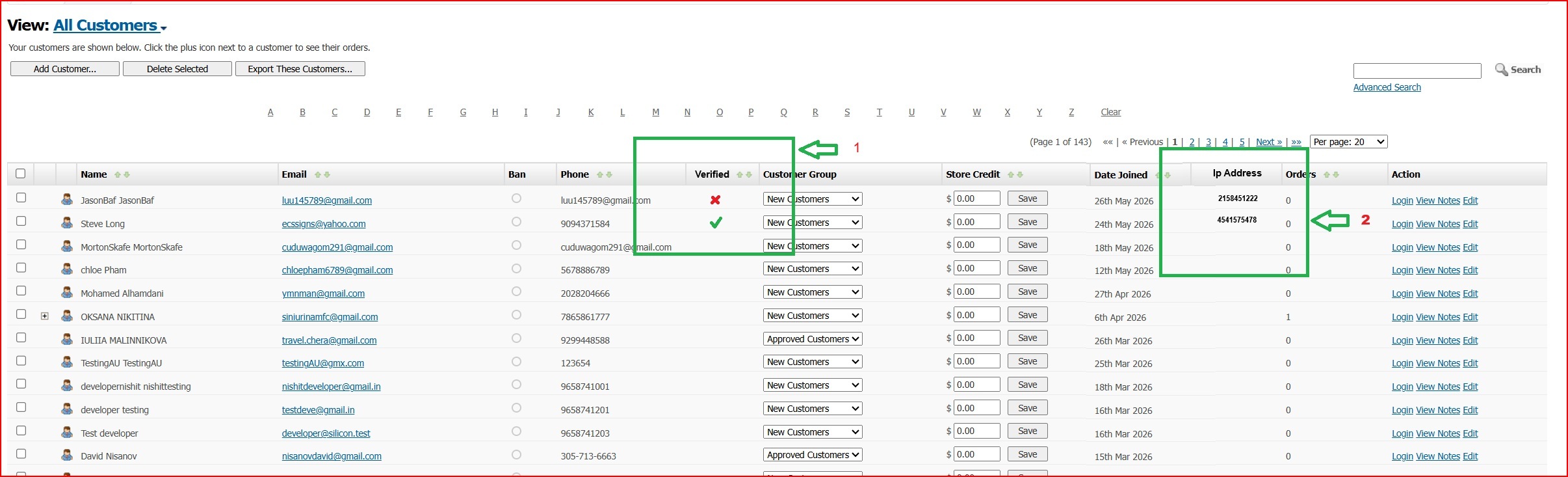
- On admin side All customers please create an extra tab where user who confirmed one’s email address will be displaid as verified. (please see screen shot attached below)
- On admin side All customers please create an extra tab where users Ip address is going to be regsitered in EN DB and displaid. (please see screen shot attached below)
- Up on registration we can use the same regestration form as we have but once new user registration form has been filed out there should be a message saying that your regetsration is resived and Excellent Numbers have sent you a registration confirmation link to the email address mentioned during registration. Please open registration verification email and click on the link to confirm your registration.
- When new member open one’s email and find the ” Click this link to confirm your Excellent Numbers account registration” link message. Once the link clicked and email confirmed. Then this customer can see our excisting default Succsessfull registration message. EN new account registration account goes to verified status (clause 1 above) and member can safely login to EN project.
- If email not verified then user’s data remains captured on admin All customers page and IP address recorded (clause 2 above). Such user can not login to the EN project and on Admin site All customers page this user maked as X not verified.
in both cases we should capture all the new members IP addresses as per (clause 2 above)
IMPORTANT:
Please make sure all work must be done on both desktop site and mobile view. We provide all access and resources to complete the job and a good manner, so please use any of those whether it requires API or webhook connectivity. It is your responsibility to check all the API docs and related documentation so your final coding outcome should not be taking time in loading, lagging or any other related but not mentioned content visualization attributes such as fonts, styles, color icons, frames and etc. The task considered completed if it is fully functioning tested and accepted by our client.
Kindly be carefull on processing this job to avoild site crushes or production interuptions so your work and after work consiquences wont cause any script confilct, break downs or down times.



Leave A Comment