
Home › Forums › NanoTelecom › Customer api management console › Reply To: Customer api management console

Hello Nishit thank you for your reply, yes please can we improve mobile view for Nanotelecom so it looks profecional.
for “NanoTelecom Improvement Ideas” there will be some ideas out lined there so we will see what we can do to improve this project from nanoTelecom experts poit ov view!
NOW FOR DNS A RECORDS
this page as you noted earliere still display 404 error, i can see that this is a Laravel error but still can not undertsnad why it happends, We have discussed this mater with system team and as they said below:
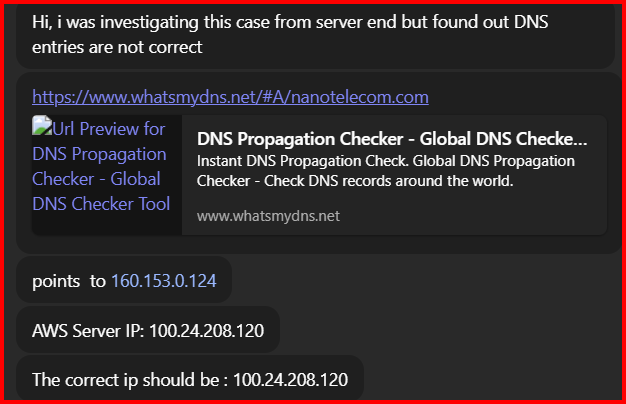
as suggested there was a IP error in A RECORD so customers chaged it but the site has crused so they had changed it bacl again.
I have requested customer to provide their GoDaddy A Record to see and here is what they provided below:
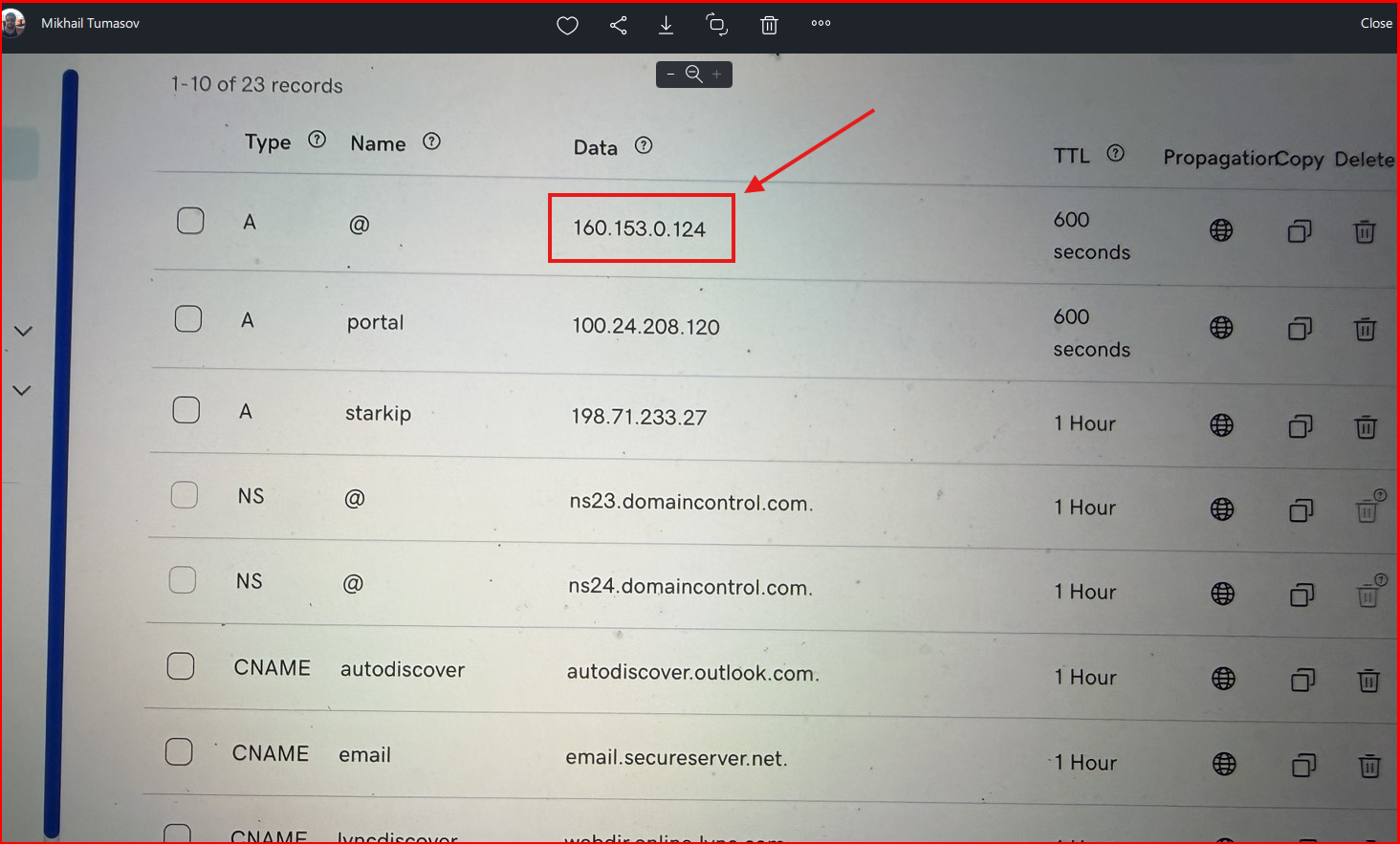
So now could you please once again review your side why https://portal.nanotelecom.com/ display error and i asked system team to inspect it again we can not close the job without resolving this issue:(
Also frustrated customers send me this Chat GPT findings if that may be used for finding a solution, please see their AI replies below:
============================ AI REPLY STARTS =============================================
Hi Team,
Our GoDaddy DNS A record for portal.nanotelecom.com already points to the correct Amazon server IP.
The following URLs behave differently:
https://portal.nanotelecom.com/ — returns 404
https://portal.nanotelecom.com/admin/login — works correctly
https://portal.nanotelecom.us/ — the portal works correctly
We want customers to access the portal using portal.nanotelecom.com exclusively, without .us appearing in the browser’s address bar.
Could you please check the application and web-server routing for the root path / on the .com hostname? Ideally, the root URL should redirect internally to the appropriate portal landing or login page, or serve the correct page directly.
Please also verify the application’s canonical/base URL and any hostname-specific redirects so the .com address remains visible throughout login and navigation.
We do not want to change the existing WordPress website or disrupt the working .us portal.
Thanks.
——————————- part 2—————————————————
As for the Portal.nanotelecom.com/admin/login – We have confirmed that portal.nanotelecom.com/admin/login loads correctly, but after a customer logs in, the browser redirects to portal.nanotelecom.us.
Our requirement is to use portal.nanotelecom.com as the permanent customer-facing domain. Customers should never see .us in the browser address bar, including after login and throughout the portal.
Please investigate and fix the following:
Laravel URL configuration: Check .env, especially APP_URL, and any hardcoded .us URLs in the application.
Authentication redirects: Check the login controller, middleware, intended redirects, and post-login destination.
URL generation: Search for absolute URLs using portal.nanotelecom.us and update the appropriate ones to use the .com domain.
Session and cookies: Verify session cookie domain, secure settings, and authentication persistence work correctly on .com. Do not share sessions across domains unnecessarily.
Web server and HTTPS: Confirm the .com virtual host points to the same Laravel application, with a valid SSL certificate.
Configuration cache: If configuration changes are made, clear and rebuild the appropriate Laravel configuration cache as part of the deployment.
Please preserve the existing working .us portal while testing the .com domain. Verify login, logout, page navigation, and any password-reset flows before deploying the change.
The desired result is that portal.nanotelecom.com works end to end and remains visible in the address bar throughout the entire customer session.
————————————part 3 —————————————–
One additional finding: when I submit valid credentials at portal.nanotelecom.com/admin/login, the page simply reloads without a visible error. The same credentials work on .us.
Please inspect the login POST request and Laravel logs to determine whether authentication is failing, the session is not persisting, CSRF validation is failing, or middleware is redirecting back to the login page. Please also confirm whether the login form submits to .com or .us.
We need to identify the root cause rather than make speculative DNS changes.
============================ AI REPLY ENDS =============================================
thank you